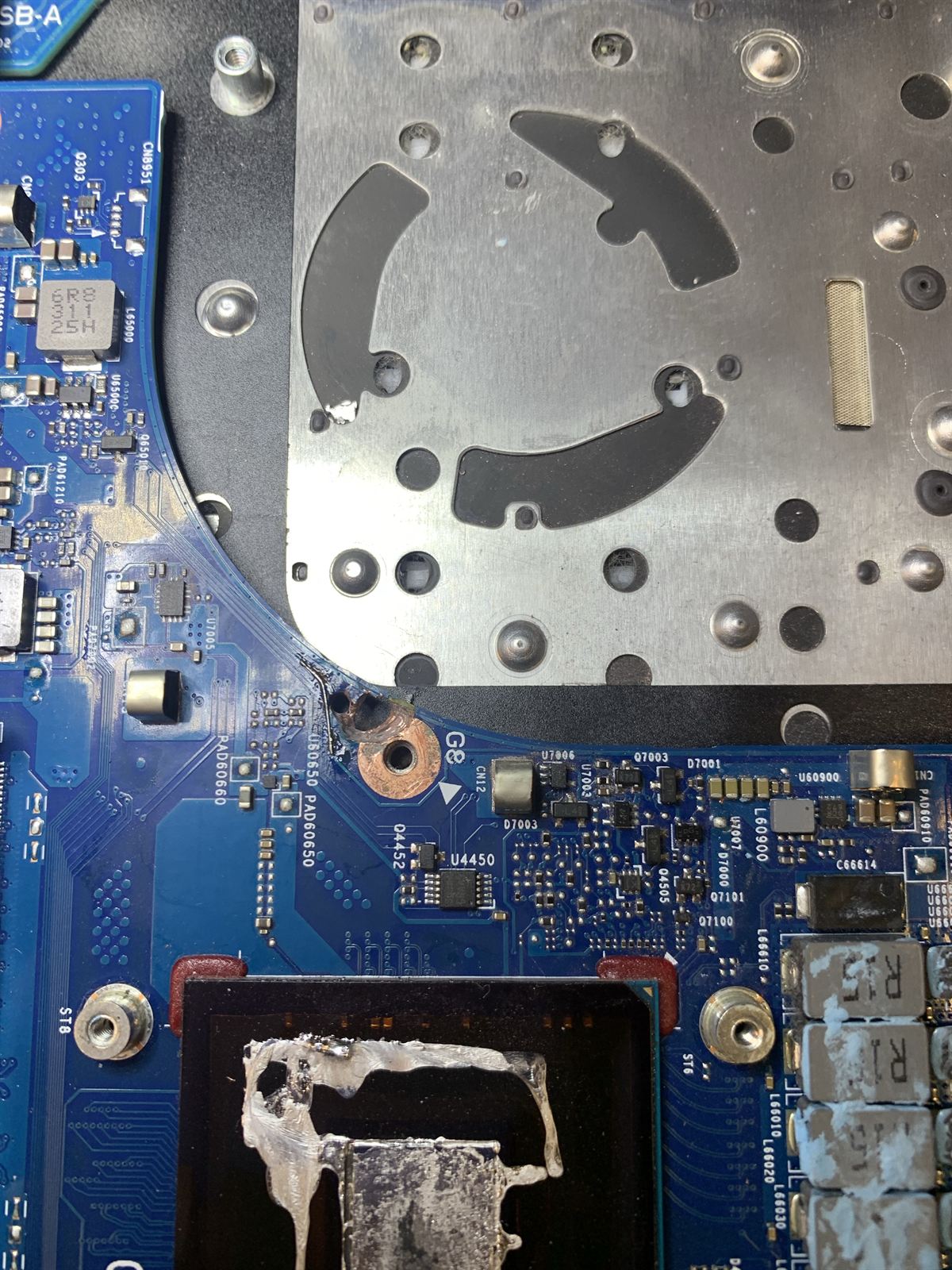
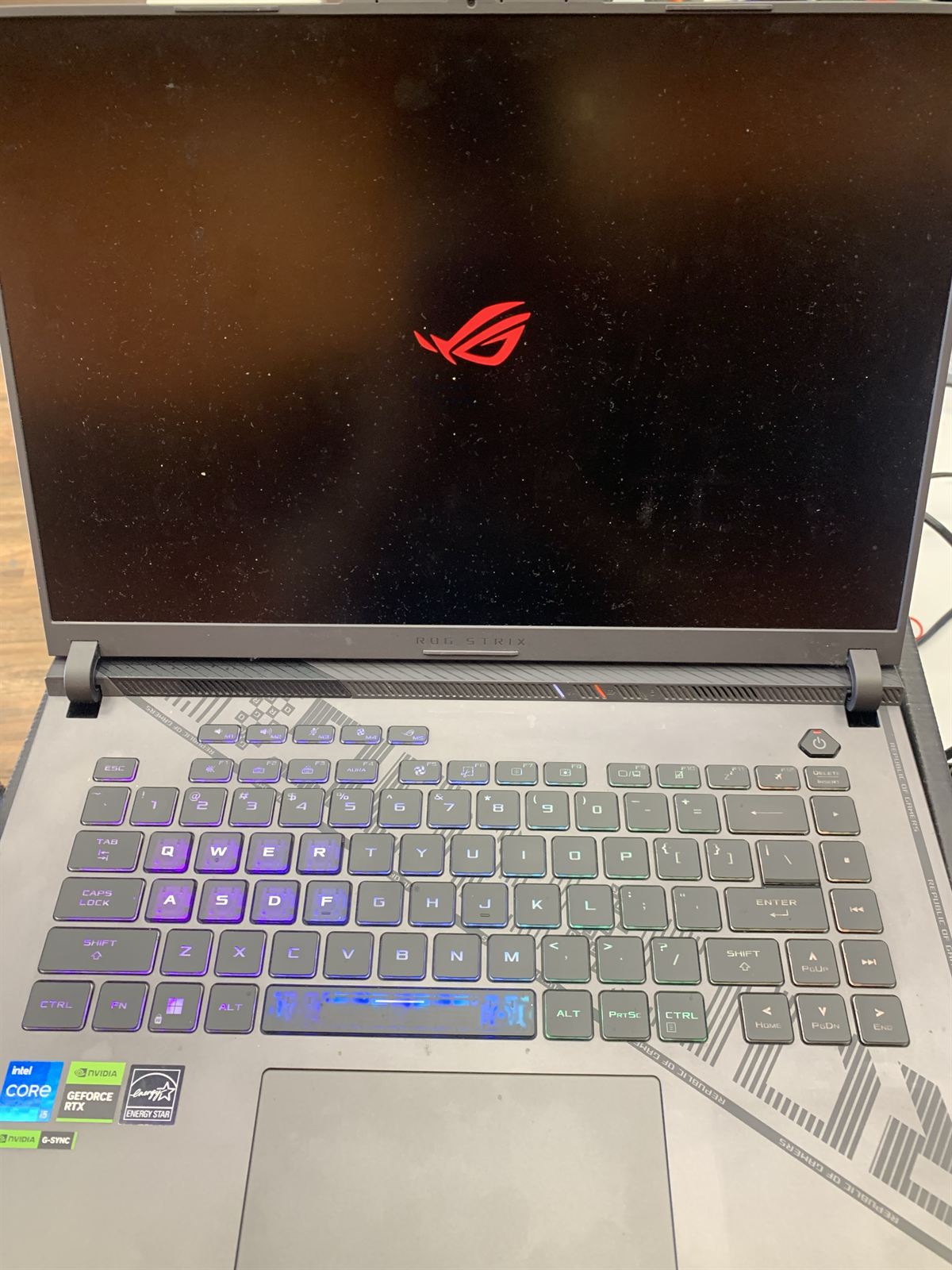
Short answer: this ASUS ROG laptop had a burn at the screw hole beside its fan, and the burn went down into the inner layers of the motherboard. We see this often: more than five ROG laptops repaired so far with the same damage. Because the copper has burnt away below the surface, cleaning is not enough. The lost connection has to be rebuilt at board level, and on this laptop that included a thin jumper wire from the VDP input to the VCC pin of the BQ24800, the battery charge controller chip. After the repair it starts, shows the ROG logo and reaches the Windows sign-in screen.
01The fault: a burn at the fan screw
The photo at the top of this page shows the motherboard of an ASUS ROG Strix gaming laptop. Beside the cooling fan there is a screw hole with a copper ring around it. On this board the ring has burnt black, the board above it has been burnt away into dark pits, and a scorched streak runs along the board edge towards the heatsink.
From above it can look like a surface mark. It is not. On this laptop, as on the others we have repaired, the burn goes down into the inner layers of the motherboard.
We have repaired more than five ASUS ROG laptops with this kind of damage at the fan screw, so we recognise the pattern when one arrives. We don't claim to know why it happens on these laptops, and from the outside nobody can tell you for certain. What we can show is what the board looks like and what it takes to bring it back.
02Under the microscope
What the footage shows
- A dark crater where the board material has burnt away.
- A brown, scorched ring around it. This is burn damage, not dirt.
- The copper pad around the screw hole, discoloured by heat.
The photos and video on this page were taken at our workshop bench. No customer details are shown.
03Why this is not a surface problem
A modern laptop motherboard is not a flat sheet with tracks on top. It is built from many thin layers of copper tracks and planes pressed together. The top layer carries the small parts you can see. Power and ground connections run through the layers underneath.
When heat burns through the top of the board at a screw hole, it can take the copper inside with it. That is why cleaning away the black, or touching up the solder on the surface, doesn't fix this kind of damage. Where copper has burnt away inside the board, the connection is gone, and it has to be rebuilt another way.
04The repair
- Open it up and find the burnTake the laptop apart and clean the damaged area so the burn can be inspected under the microscope.
- Work out how deep it goesOn these boards the burn reaches an inner layer, so the repair has to deal with what is missing inside the board, not only what is visible on top.
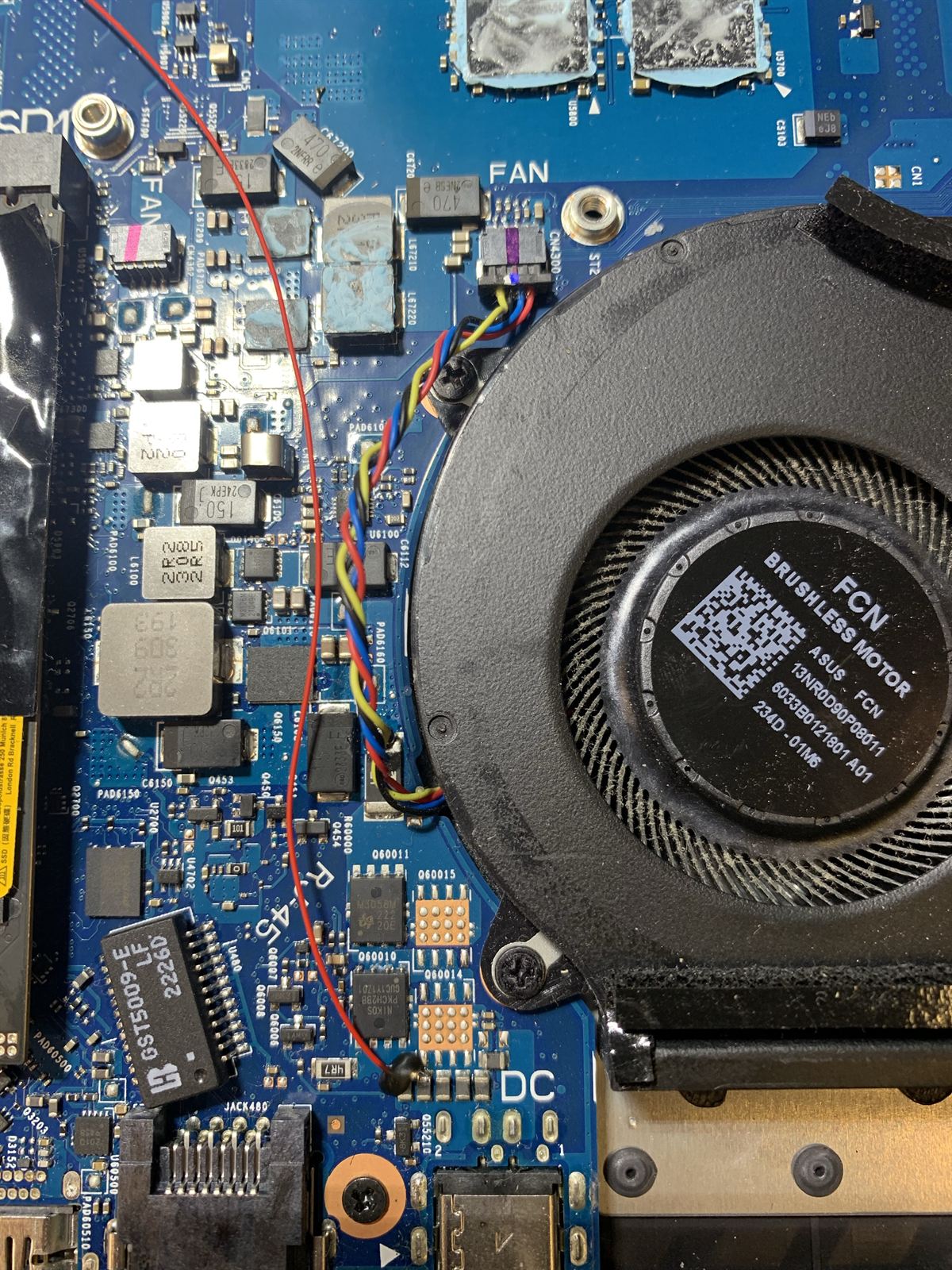
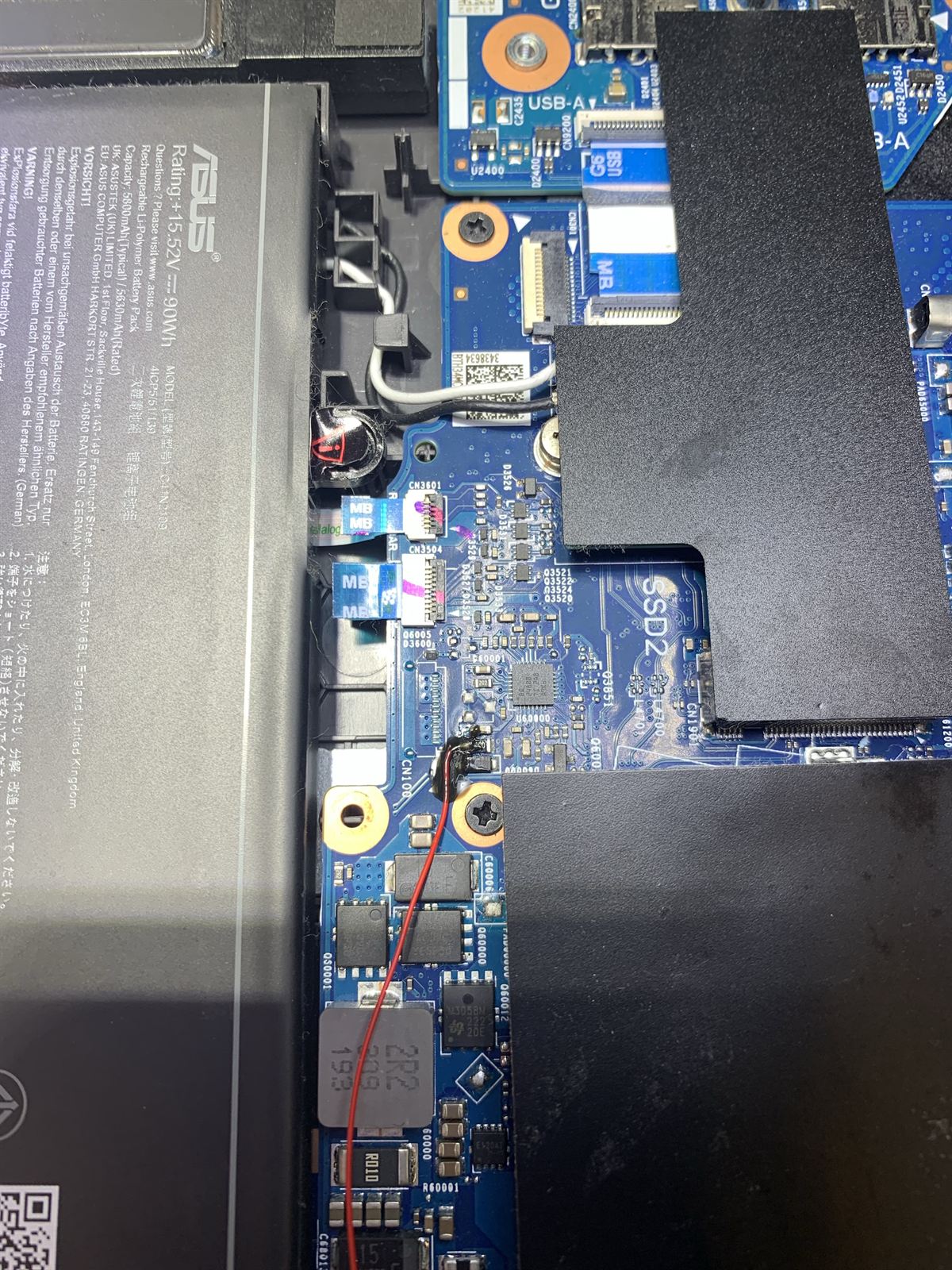
- Rebuild the lost connectionWhere copper has burnt away, a thin jumper wire carries the connection around the damage. On this laptop the red wire is a jumper from the VDP input across to the VCC pin of the BQ24800, the chip that controls battery charging.
- Power it up and testPut it back together enough to start it and check it boots properly before it goes anywhere near the customer.
05Powered up again
With the repair done, this laptop starts: the ROG logo comes up, then Windows reaches its sign-in screen. We don't publish the sign-in screen itself, because it shows the owner's account name.
06More than five of these
ASUS ROG laptops repaired at CQ Electronics with a burn at the fan screw, and the same kind of damage down into the inner layer of the board.
Seeing the same burn again and again is how we know it is a pattern and not a one-off. We are not the only ones to notice: owners have started threads about burnt ROG Strix motherboards near the fan on ASUS's own ROG forum, for example this thread about a ROG Strix G16. We make no claim about the cause. What matters to an owner is simple: if your ROG laptop has this burn, stop using it and have the board looked at.
07If your ROG laptop has this
- Smell of burning or a hot spot near the fan? Unplug the charger and stop using the laptop.
- Won't power on, or shuts off by itself? A burnt board is one of the things we check for.
- Opened it and seen black marks near the fan? Take a clear photo of the area before anything is touched.
- Tempted to keep pressing the power button? Don't. Repeated power-ups into a burnt board can make the damage worse.
To get a quote, send us the make and model (the model number is on the sticker underneath), the symptoms, and photos of the burn if you have them. We take postal repairs Australia-wide, so contact us first and we will confirm before you send it.
5% off every repair, or a 5% price beat
No competitor quote needed for the discount: every laptop repair booked with CQ Electronics in Brisbane comes with an automatic 5% off the quoted price. And if you find a genuine lower price for the same repair elsewhere, we will beat it by 5%. The price beat can't be combined with the 5% off, so you get one or the other.
Frequently asked questions
Can a burnt ASUS ROG laptop motherboard be repaired?
Often, yes, when the damage can be assessed and the lost connections rebuilt. On the ROG laptops we have repaired, the burn went down into an inner layer and was repaired at board level, including with jumper wire. Not every burnt board can be saved, so we look at the damage first and confirm before any major work.
Why is there a burn mark beside the fan screw on my ASUS ROG laptop?
We can't give you a cause from the outside and we won't guess. What we can say is that we have repaired more than five ROG laptops with a burn at the fan screw, so it is a recurring pattern and not a one-off. The board has to be opened to see how far the damage goes.
Is the burn only on the surface of the board?
Not on the ROG boards we have repaired. The burn went down into the inner layers of the motherboard, which is why cleaning the surface is not enough and the lost connection has to be rebuilt.
What was the red jumper wire on this ROG motherboard for?
It is a short jumper wire from the VDP input across to the VCC pin of the BQ24800, the battery charge controller chip on the board. VCC is the supply pin of that chip, so the wire feeds it directly from the VDP input. A jumper like this takes over a connection that the board can no longer make on its own.
Is it safe to keep using a laptop with a burnt motherboard?
No. A burning smell, a hot spot near the fan or scorch marks mean you should unplug the charger and stop using the laptop until the board has been checked.
How much does ROG laptop motherboard repair cost in Brisbane?
It depends on how far the damage goes. We look at the board and quote before any major work. Every repair booked with CQ Electronics includes 5% off the quoted price. If you find a genuine lower price for the same repair elsewhere, we will beat it by 5%. The price beat can't be combined with the 5% off, so you get one or the other.
Do you repair other ASUS and gaming laptops?
Yes. We repair every make of laptop, ASUS included, and gaming laptops are no exception. Send us the make, model and fault when you request a quote.
Can I post my laptop to you from outside Brisbane?
Yes, we accept postal repairs Australia-wide for eligible electronics. Contact us first with the make, model and fault so we can confirm it before you send it.
Will you beat a cheaper quote from another Brisbane repairer?
Yes. Every repair already includes 5% off the quoted price, and if you find a genuine lower price for the same repair elsewhere, we will beat it by 5%. The price beat can't be combined with the 5% off, so you get one or the other. Tell us about the other price when you request a quote.
ASUS ROG laptop with a burnt motherboard?
Send us the make and model, the symptoms and any photos of the burn. CQ Electronics repairs laptop motherboards at component level from our workshop in Seventeen Mile Rocks, Brisbane, with 5% off every repair, or a 5% price beat on any genuine lower price (not combined).
Request a quote →Related repair guides
- Laptop repair in Brisbane: every make, from no-power faults to screens and charging ports
- Laptop motherboard repair in Brisbane: dead laptop, no display, random shutdowns
- Lenovo laptop with no power: another board repaired, with a short buried in an inner layer
- Spilled liquid on your laptop: what to do and why drying is not enough
- Laptop not charging: charging port, DC jack and USB-C repair