Short answer: if a Samsung Galaxy won't turn on, charge it for 30 minutes with a charger and cable you know work, look for lint in the USB-C port, then force restart it by holding Volume Down and the Power (side) key together for about 7 seconds. If it vibrates but the screen stays black, the display is the likely cause. If it loops on the Samsung logo it can be software or a deeper fault. If nothing happens at all, the cause is often the battery, the port or the power circuit on the board. CQ Electronics checks it free and quotes before any repair.
01Try these first
- Charge it for 30 minutesUse a charger and USB-C cable you know work, plugged into a wall socket. A flat battery can take a while to show anything.
- Look in the USB-C portShine a torch in. Lint packed into the port stops the cable seating. Clear it gently with a wooden toothpick, never metal.
- Force restart itHold Volume Down and the Power (side) key together for about 7 seconds, until the Samsung logo appears.
- Try wireless chargingIf the phone has it, a wireless pad charges it without using the port.
02What the symptom tells us
03Stuck in a boot loop: careful with Recovery mode
A Galaxy that loops on the Samsung logo can sometimes be brought back from Recovery mode, which you enter with a key combination for your model (usually Volume Up and Power while the phone is off and plugged into a computer). It offers Wipe cache partition, which keeps your data, and Wipe data / factory reset, which erases it. Try the cache wipe first, and don't factory reset without a backup.
If the loop continues, the fault is often hardware.
04Why it is often not the whole phone
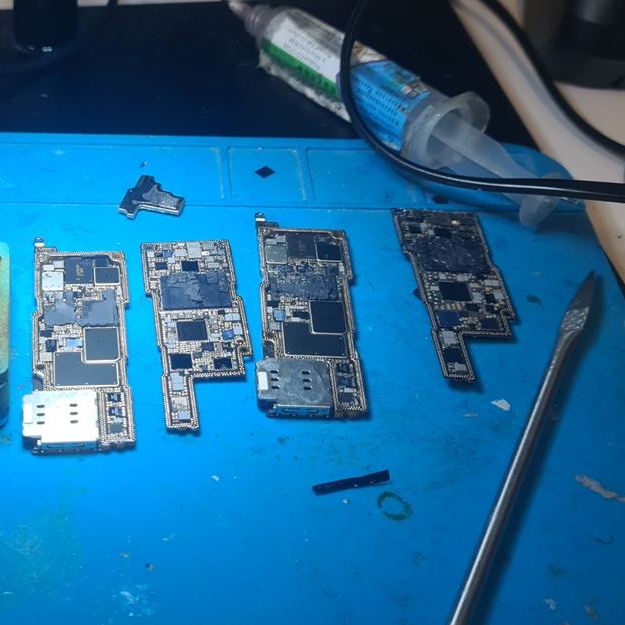
A phone that won't turn on is often one failed part in the power circuit, not a dead phone. The usual suspects are the battery, the charging port or a power-management chip on the board, and a short can come from water or a drop. Diagnosis means measuring what the board draws and finding the part that has failed. See our iPad PMIC repair case study for what board-level diagnosis looks like.
- Dead phoneNo response to the button or the charger.
- Basic checksCharger, port and a force restart.
- Bench testWe measure what the board draws and where power stops.
We work here - RepairThe failed part is replaced, or the damaged track repaired.
- WorkingThe phone starts and charges, and is tested.
We aim to repair the hardware without erasing the phone. If the storage itself has failed, data may not be recoverable, and we tell you after we have looked. If your Galaxy is still inside Samsung's warranty for the fault, check with Samsung first, because a repair by anyone else can affect warranty cover.
05How we handle it
- Send us the detailsThe Galaxy model, what it does when you press the key and when it is plugged in, and whether it got wet or was dropped.
- We assess itWe confirm the fault and tell you what the repair involves.
- Quote before workThe price is confirmed before any repair starts. Phone and tablet prices are fixed and include GST.
- Repair and testThe repair is made and the device is tested before it goes back to you, with a 6-month repair warranty.
Our workshop is at Unit 24/500 Seventeen Mile Rocks Rd, Seventeen Mile Rocks, in Brisbane's south-west, open 8:30 AM to 5:00 PM every day. Drop-off is by arrangement, so send a request or call 0451 008 959 first. We also take postal repairs Australia-wide for eligible electronics: contact us first and we will confirm.
06Is this your Galaxy?
- No response to the key or charger? Try 30 minutes on a good charger, then a force restart.
- Black screen but it vibrates? The display is the likely fault.
- Stuck on the Samsung logo? Try Wipe cache partition. If that fails, it is probably hardware.
- Got wet or dropped before it died? Tell us. It points straight at the board.
To get a quote, send us the make and model, what it does and what you have tried.
Found it cheaper? We beat it by 5%
If you find a genuine lower price for the same repair elsewhere, send us the quote and we will beat it by 5%.
Frequently asked questions
Why won't my Samsung Galaxy turn on or charge?
The common causes are a flat or worn battery, a USB-C port clogged with lint or damaged, a bad cable or charger, and a fault in the power circuit on the board. We check them in that order.
How do I force restart a Samsung Galaxy?
Hold Volume Down and the Power (side) key together for about 7 seconds until the Samsung logo appears.
My Galaxy screen is black but it still vibrates. Is it dead?
No. The phone is running and the screen isn't showing it, so the display is the likely fault. See our screen guide.
My Galaxy is stuck on the Samsung logo. What do I do?
Force restart it first. If it stays stuck, Recovery mode has a Wipe cache partition option that keeps your data. If that fails, the fault is often hardware.
Can you recover my data from a Galaxy that won't turn on?
If the board can be repaired so the phone starts, the data is usually still on it. If the storage chip has failed, it may not be recoverable. We tell you after the free check.
Is it the battery or the charging port?
A phone that charges at some angles or with some cables points at the port. A phone that drains fast or shuts off with charge showing points at the battery. See our battery guide and charging port guide.
How much does it cost to fix a Galaxy that won't turn on?
It depends on the cause, so we check it first and quote before any repair. If it only needs a battery or a port, the fixed prices are on our price page.
Will you beat a cheaper quote from another Brisbane repairer?
Yes. If you find a genuine lower price for the same repair elsewhere, we will beat it by 5%. Tell us about the other price when you request a quote.
Galaxy dead or stuck?
Send us the model and what it does. CQ Electronics checks phones that won't turn on free, diagnoses at board level and quotes before any repair, with a 6-month repair warranty.
Request a quote → Call 0451 008 959Related repair guides
- Samsung Galaxy repair in Brisbane: fixed prices for every model, free check, 6-month warranty
- Phone and tablet repair in Brisbane: screens, batteries, charging ports and board-level repair
- Phone and tablet repair prices: fixed prices by model, GST included
- Samsung Galaxy battery replacement in Brisbane: signs of a worn or swollen battery
- Samsung Galaxy water damage repair in Brisbane: what to do in the first hour