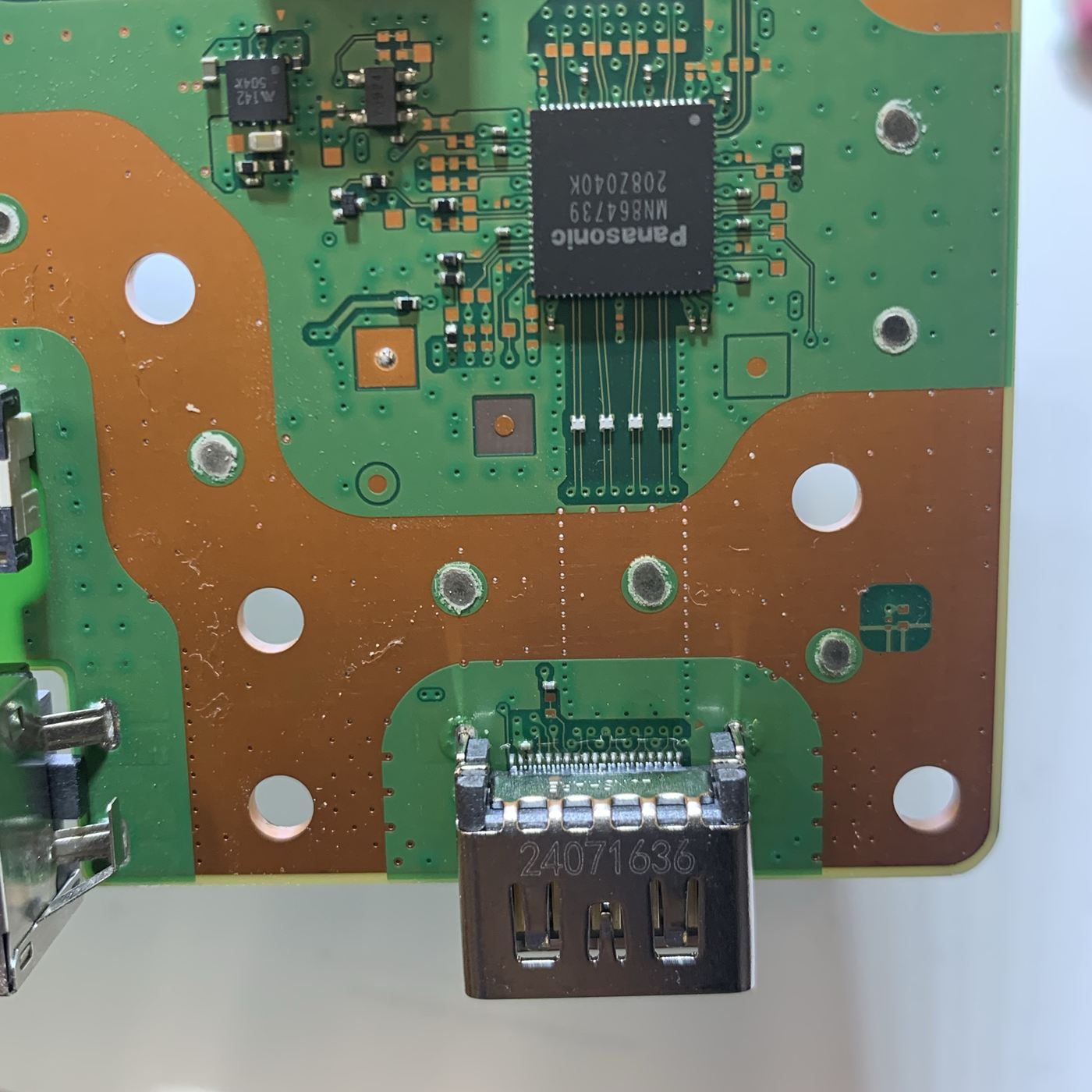
Short answer: if your PS5 turns on normally (light, fan, controller connects) but shows no picture or "no signal" on every cable, TV and input, the fault is usually in the HDMI path: the HDMI port, the chip beside it, or the board tracks between them. A port that is loose, bent or torn is replaced at board level, and if the pads under it are damaged they are rebuilt first. Try another HDMI cable and TV before anything else, don't force a cable into the port, and don't open the console. If the console shows no light at all, that is a power fault and a different job. CQ Electronics tests the console on the bench, confirms the price before any repair, and takes postal repairs Australia-wide.
01The fault: PS5 on, no picture
The photos in this article were taken at our workshop bench. They show the HDMI port on the main board of a PlayStation 5, the small chip beside it and, on the other side of the board, how the port is held on. No customer details are shown.
A PS5 with an HDMI fault usually shows one or more of these:
- The console turns on, the light and fan behave normally and the controller connects, but the TV says no signal.
- The picture flickers, drops out or comes and goes when the cable or the console is moved.
- The cable feels loose or wobbly in the port, or doesn't click in firmly.
- The port looks bent, cracked or lifted from the console, or a pin inside it is out of line.
- A different cable or TV makes no difference.
These are not the same as a console that won't switch on at all. That is covered in No picture or no power? below.
02Why PS5 HDMI ports fail
The HDMI port sits right at the edge of the board, and it is the part everyone plugs a cable into and pulls on. The photo at the top of this page shows it: a row of fine pins soldered along the top of the connector carries the picture signal, and the metal shell is held to the board by its own legs, which you can see on the reverse side in the photo further down.
A cable that is yanked, a console that is knocked or moved while the cable is in, or a heavy cable pulling sideways puts that strain on the joints. Over time the contacts can bend, the shell can loosen and joints can crack. In a bad case the strain lifts the copper pads off the board under the port.
- StrainA pulled, knocked or forced cable.
- DamageBent contacts, a loose shell or cracked joints.
- No signalThe picture drops out or never appears.
- Bench testThe port, the chip and the board are tested.
We work here - Picture backThe new port is fitted and tested on a screen.
03The port, the chip, or something else
"No picture" does not always mean a broken port. On a PS5 the picture signal passes through a separate chip beside the port. In the photo at the top of this page it is the Panasonic MN864739 above the port, with four small parts and fine tracks running down to the connector. So the fault can sit in one of three places, and the console has to be tested to tell which.
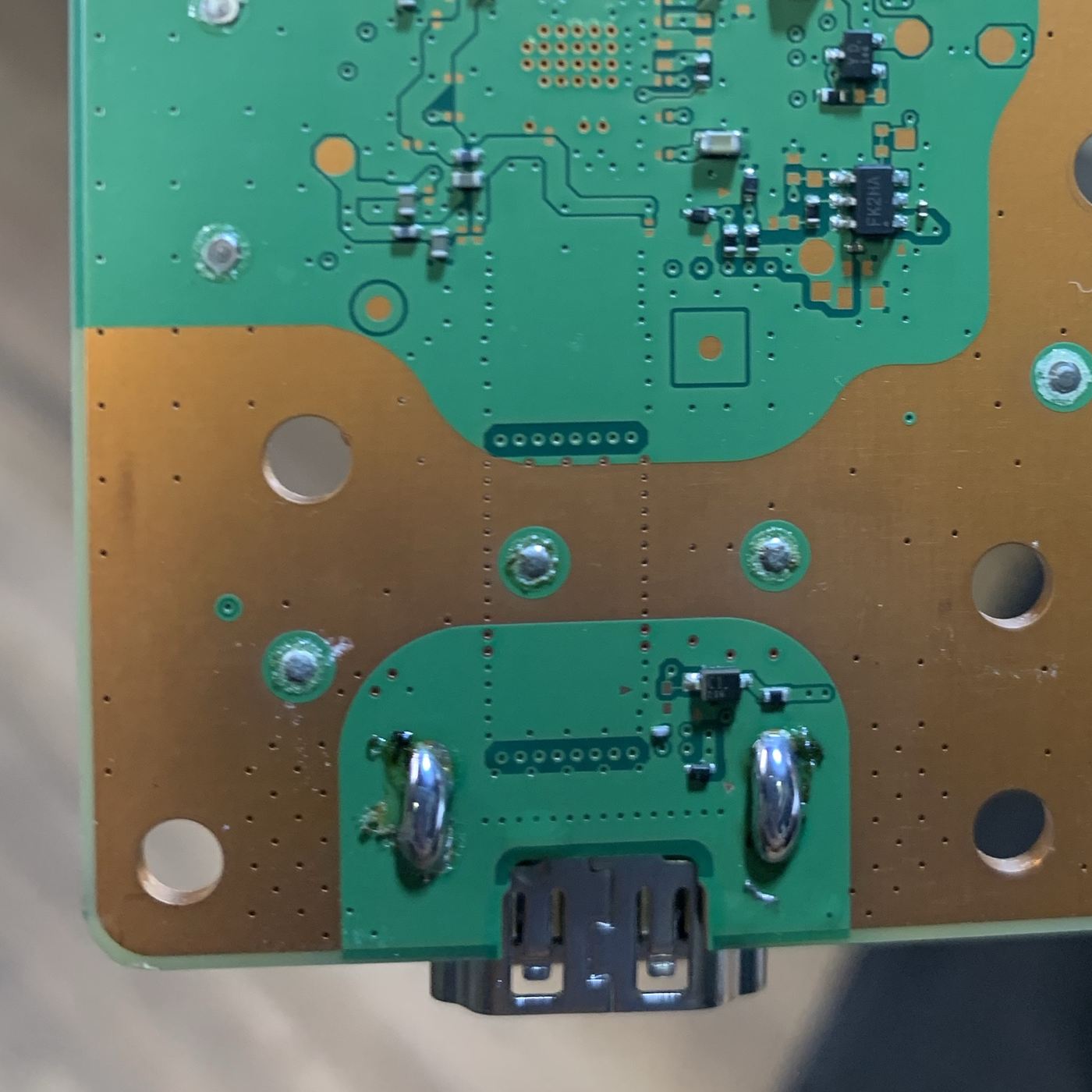
How the port is held on
This is the other side of the same board, at the same port. The two shiny blobs are the metal legs of the port's shell, which pass right through the board and are soldered. They take the strain when a cable is pulled, which is why a rough cable can crack these joints or lift the pads on the front.
Replacing a port means taking all of these joints apart cleanly and putting a new connector on, without lifting the copper from the board.
04Safe checks to try first
These cost nothing and are safe to do at home. If none of them brings the picture back, stop there.
- Try another HDMI cable. Use one that is known to work, ideally the Ultra High Speed cable that came with the PS5, and push it in gently until it seats.
- Try another TV input, or another TV. A bad TV port or setting looks exactly like a bad console.
- Plug straight into the TV. Take out any soundbar, AV receiver or capture box in between, which can fail to pass the signal on.
- Look into the port with a torch. Look for a bent contact, dust or something stuck inside. Don't poke it with anything metal.
- Don't wiggle the cable to "find" the picture. Moving it while it is plugged in is what cracks joints and lifts pads.
- Try Safe Mode if it started after a settings or TV change. With a controller connected by USB cable, hold the console's power button until you hear the second beep (about 7 seconds). Safe Mode gives a basic picture, so you can reset the video output. If there is still no picture in Safe Mode, settings are not the cause.
- Don't open the console or force the cable. Opening it can affect your Sony warranty.
05How an HDMI port is replaced
- Test the consoleWe confirm the fault: the picture is tested on the bench, and the port and board are inspected under magnification.
- Remove the old portThe console is opened, the board is taken out and the damaged port is taken off the board.
- Check and clean the padsThe pads and tracks under the port are cleaned and inspected. If the strain has torn any off, they are rebuilt first. See how that is done in our Xbox HDMI port guide.
- Fit the new portA new connector is soldered on, including the legs of the shell, so it is held on firmly.
- Test it on a screenThe console is put back together and run on a TV, so the picture is confirmed before it goes back to you.
Whether a straightforward swap is enough depends on the pads. If they are intact, it is the shorter job. If several have gone, it takes longer. We tell you which it is after inspecting the console, before any repair starts.
06No picture or no power?
Two different faults get mixed up. What the console does when you press the button tells you which one you have.
07Xbox and other consoles
The same idea applies to other consoles: a port that takes the strain of the cable, pads that can lift, and a fault that is not always the port. We repair HDMI ports on PlayStation and Xbox consoles. For a case where the pads had been torn off an Xbox, read Xbox HDMI port replacement in Brisbane. The full list of console faults we repair is on our console repair page.
08How we handle it
- Send us the detailsThe console model, what it does when you switch it on, what you have already tried and when it started. A photo of the port helps.
- We test the consoleWe confirm whether it is the port, the chip or something else, and tell you what the repair involves.
- Quote before workThe price is confirmed before any repair starts.
- Repair and testThe repair is made and the picture is tested on a screen before the console goes back to you.
Our workshop is at Unit 24/500 Seventeen Mile Rocks Rd, Seventeen Mile Rocks, in Brisbane's south-west, open 8:30 AM to 5:00 PM every day. Drop-off is by arrangement, so send a request or call 0451 008 959 first. We also take postal repairs Australia-wide for eligible electronics: contact us first and we will confirm.
09Is this your console?
- PS5 turns on but the TV says no signal? If a different cable and TV change nothing, the HDMI path needs testing.
- Picture that cuts out when the cable moves? That is a loose or cracked connection at the port.
- Cable that no longer clicks in? The port may be bent or the shell loose. Stop using it before more is damaged.
- Told you need a whole new console? Ask whether the HDMI port or the board can be repaired instead.
To get a quote, send us the console model, what it does and what you have tried. See also our console repair in Brisbane page.
Found it cheaper? We beat it by 5%
If you find a genuine lower price for the same repair elsewhere, send us the quote and we will beat it by 5%.
Frequently asked questions
Can a PS5 HDMI port be replaced?
Yes. The HDMI port is a connector soldered to the console's main board, so it can be removed and a new one fitted, as long as the board underneath is in good shape. If the pads or tracks under the old port have been damaged, they have to be repaired first. We inspect the console and tell you what it needs before any work starts.
My PS5 turns on but there is no picture. Is it the HDMI port?
It might be, but not always. If the console powers up normally (light, fan, controller connects) and no picture appears on any cable, TV or input, the HDMI path is the first place to look, and that path includes the port, the chip beside it and the board tracks between them. A different cable and TV are the quick checks. If those change nothing, the console needs to be tested on the bench.
How do you tell a bad HDMI port from a bad HDMI chip?
By testing, not guessing. A port that is loose, bent or visibly damaged points to the port. A port that looks perfect and still gives no picture means the rest of the HDMI path has to be tested. On a PS5 the signal passes through a separate chip beside the port (the Panasonic chip in the photo at the top of this page), so a no-picture fault is not always the port itself.
The pins inside my PS5 HDMI port look bent. Can I straighten them?
Please don't. The contacts inside the port are tiny, springy and easy to snap, and anything metal that touches them can short them. A port with bent or broken contacts is normally replaced rather than straightened.
Will I lose my games and saves if the HDMI port is replaced?
A port replacement is work on the connector, not on the console's storage, and we don't wipe or reformat the console. We can't promise that nothing can ever go wrong with a board repair, so if your console still gives a picture, back up your saves first (the PlayStation Plus cloud or a USB drive).
Does repairing the HDMI port affect my Sony warranty?
It can. If your PS5 is still inside Sony's warranty, check with Sony or the shop that sold it before anyone else opens the console, because repairs by a third party can affect warranty cover.
My PS5 will not turn on at all. Is that the HDMI port?
No. A console that shows no light and makes no sound has a power problem, not a picture problem. The cause can be the power supply, a short on the board or a failed component. See our guide to a console that won't turn on or overheats.
Do you repair Xbox HDMI ports as well?
Yes. We repair HDMI ports on PlayStation and Xbox consoles. See our Xbox HDMI port replacement guide for a case where the pads had been torn off the board.
Is there a PS5 HDMI repair near me in south-west Brisbane?
Our workshop is at Unit 24/500 Seventeen Mile Rocks Rd, Seventeen Mile Rocks QLD 4073, a short drive from Jindalee, Mount Ommaney, Sinnamon Park, Darra, Oxley and Sumner. We are open 8:30 AM to 5:00 PM every day. Drop-off is by arrangement, so send a request or call 0451 008 959 before you come.
How much does a PS5 HDMI port replacement cost in Brisbane?
PS5 HDMI port replacement at CQ Electronics starts from $149. The final price depends on what the inspection finds, for example whether the pads under the port are intact, and we confirm it before any repair starts. If you find a genuine lower price for the same repair elsewhere, we will beat it by 5%.
Can I post my console to you from outside Brisbane?
Yes, we accept postal repairs Australia-wide for eligible electronics. Contact us first with the console model and what it does, so we can confirm it is suitable, and pack the console so it can't be knocked around in transit.
Will you beat a cheaper quote from another Brisbane repairer?
Yes. If you find a genuine lower price for the same repair elsewhere, we will beat it by 5%. Tell us about the other price when you request a quote.
PS5 with no picture or no signal?
Send us the console model and what it does. CQ Electronics repairs PlayStation and Xbox HDMI ports from our workshop in Seventeen Mile Rocks, Brisbane, with the price confirmed before any repair and a 5% price beat on any genuine lower price.
Request a quote → Call 0451 008 959Related repair guides
- Console repair in Brisbane: HDMI ports, no-power faults, overheating and board assessment for PlayStation and Xbox
- Xbox HDMI port replacement in Brisbane: torn pads rebuilt under the microscope
- Console won't turn on or overheating?: safe checks before you bring it in
- Oscilloscope vs multimeter: why proper test equipment matters